Store & Purchases
Activating a Partner Store code
Guidance on how to activate a product code after purchasing a product from a Partner Store.
Updated 2026-05-31
Recieving an Activation Code
Upon purchasing a CSS Product from one of our Partner Stores, you will recieve an Activation Code for your product with the order details.
Creating a CSS Launcher Account
Follow the steps in This Article to create a CSS Launcher account.
Activating your License
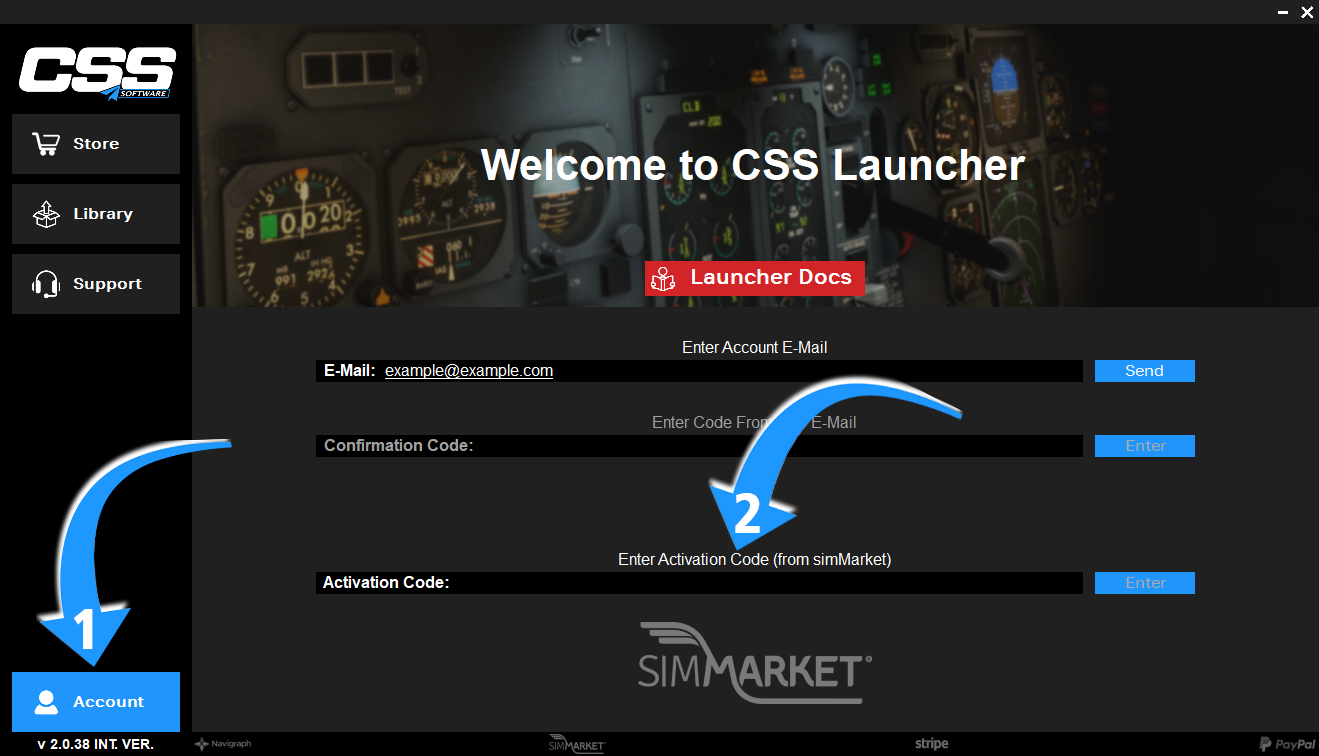
After successfully confirming your email address, open the Account tab in the CSS Launcher.
Article media
Paste your Activation Code into the Activation Code field and press Enter on the right.
Your license should now be activated.
Related articles
Browse similar articles
Need support?
Open the CSS Support Center
Source: CSS Launcher User Manual, Rev. 5 — December 2025.